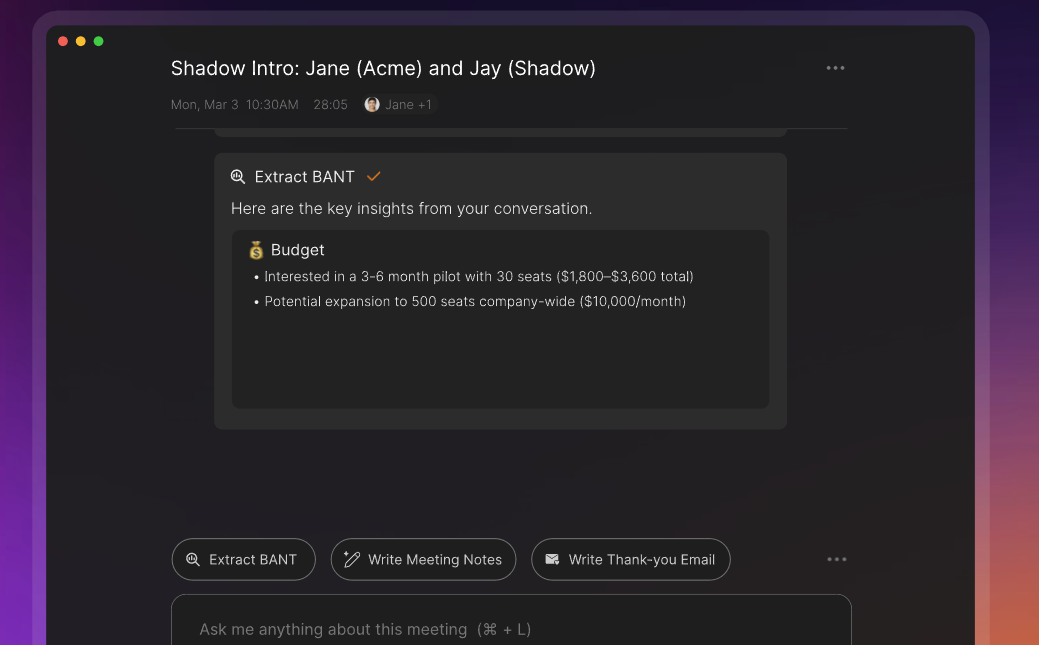
Let’s face it—most meetings feel productive in the moment… but a week later, you’re wondering what was actually decided. Tasks get forgotten, notes are scattered, and follow-ups are missed. If this sounds familiar, you’re going to love what Shadow does.
In this blog, I’ll break down my hands-on experience with Shadow, an AI tool designed to supercharge your meetings—without bots interrupting your flow. From setup to real-world use, here’s everything you need to know.
💡 First Impressions: Clean, Quiet, Powerful
The first thing that struck me about Shadow was how seamless it felt. You don’t have to invite a bot to your meeting (thank goodness!). Once connected to your calendar and meeting platforms like Zoom, Google Meet, or Slack, Shadow works quietly in the background. No awkward “AI has joined the meeting” moments—just natural, uninterrupted conversations.
Setting it up took under 10 minutes. The dashboard is clean and intuitive. You instantly get a sense that this tool is built for professionals who care about clarity and action.
🔍 Key Features That Actually Make Sense
Here’s what I tested—and loved:
✅ Autopilot Meeting Detection
No more “Did I remember to record that meeting?” Shadow automatically detects and logs meetings based on your calendar. No need to press any buttons.
✅ Accurate, Real-Time Transcription
The transcriptions are impressively accurate, with speaker identification and timestamps. I ran a test with heavy accents, and Shadow handled it like a pro.
✅ Instant Action Item Extraction
This is a game-changer. Shadow doesn’t just listen—it understands. It pulls out to-dos, assigns them to people (based on context), and adds due dates. Magical.
✅ Ask Anything with Chat
Forgot what someone said last week? You can literally ask Shadow: “What did we decide about the Q3 campaign?” and it pulls the answer from past meetings. No scrolling through transcripts.
✅ Summaries, Debriefs & Follow-Ups
After a meeting, Shadow generates a clean summary, an internal debrief, and even drafts follow-up emails for clients or teammates. You can customize tone and detail level. Huge time-saver.
⚙️ Performance: Smart, Fast, and Surprisingly Human
Shadow isn’t just fast—it’s smart. The action items and summaries felt like they were written by a team assistant who actually attended the meeting. I rarely needed to edit them. Even the follow-up emails were professional enough to copy-paste directly into Gmail.
No lag, no hiccups, and it worked consistently across Zoom and Google Meet.
🔁 Shadow vs. Alternatives: Quietly Smarter
I’ve used Otter.ai and Fireflies.ai before—both good, but Shadow offers a different experience:
| Feature | Shadow | Otter.ai | Fireflies.ai |
|---|---|---|---|
| Bot-Free | ✅ Yes | ❌ No | ❌ No |
| Action Items | ✅ Smart & contextual | ⚠️ Limited | ✅ Available |
| Post-Meeting Emails | ✅ Custom & editable | ❌ No | ⚠️ Basic |
| Real-time chat with past meetings | ✅ Yes | ❌ No | ⚠️ Limited |
Shadow’s biggest edge? Privacy. It processes data locally, meaning your meeting data stays yours.
💰 Pricing: Worth It?
Shadow doesn’t list detailed pricing publicly—you have to contact them for custom plans. But from what I’ve seen, they offer team and enterprise-level packages.
Is it worth paying for? If meetings are a major part of your workflow (especially in sales, project management, or leadership), yes. Even if it saves you just 1 hour per week, it pays for itself.
✅ Pros and Cons
Pros:
- No bots—just clean, invisible integration
- Impressive action item extraction
- Transcription accuracy is top-tier
- Chat feature makes searching old meetings super easy
- Saves serious time with follow-up summaries
Cons:
- No public pricing
- Might take a week to explore all its features fully
👥 Who Should Use Shadow?
If you’re a…
- Remote team lead
- Project manager
- Sales rep
- Client-facing consultant
- Executive drowning in meetings
…then Shadow will feel like hiring a virtual assistant who never forgets anything.
🧠 Final Verdict: The Quiet Assistant You Didn’t Know You Needed
After using Shadow for a week, I can say this: It doesn’t just record your meetings—it understands them.
If you’re tired of taking notes, chasing action items, or wondering “what did we agree on again?”—give Shadow a try. It’s not flashy or loud. It just quietly gets the job done.
⭐ My Rating: 4.8/5
🔄 Pro Tips & Alternatives
- Pro tip: Integrate with your project management tool (like Asana or ClickUp) to auto-sync action items.
- Alternatives: Otter.ai is good for basic transcription. Fireflies.ai is decent for action items. But if you want privacy, real intelligence, and hands-free meetings—Shadow wins.
Visit their website for more information. Also visit our website for more cool tools!